Danny Hearn
in Book a call

Case studies Turning scattered feedback into decisions

UK Government department, Microsoft Power Apps, 2026

Turning scattered feedback into decisions

Feedback about the service arrived through multiple channels, from service desk tickets to user testing, and nobody had the whole picture, so the loudest voices and closest relationships carried the most weight. I built one place where all of it lands on equal terms: forward an email or paste into Teams, and AI files and groups it, with no extra effort for anyone. It runs inside the department's own Microsoft 365, and a monthly review now exists that never did.

Client
UK Government department
My role
Service Designer, Power-app developer
Built with
Teams, Copilot Studio, AI Builder, Power Automate, Power Apps, SharePoint
Status
Live, handed to the service desk and Power Platform teams
Duration
2026, three to four months
Outputs
Feedback loop design, Teams capture bot, decision app, monthly themes, feedback chatbot
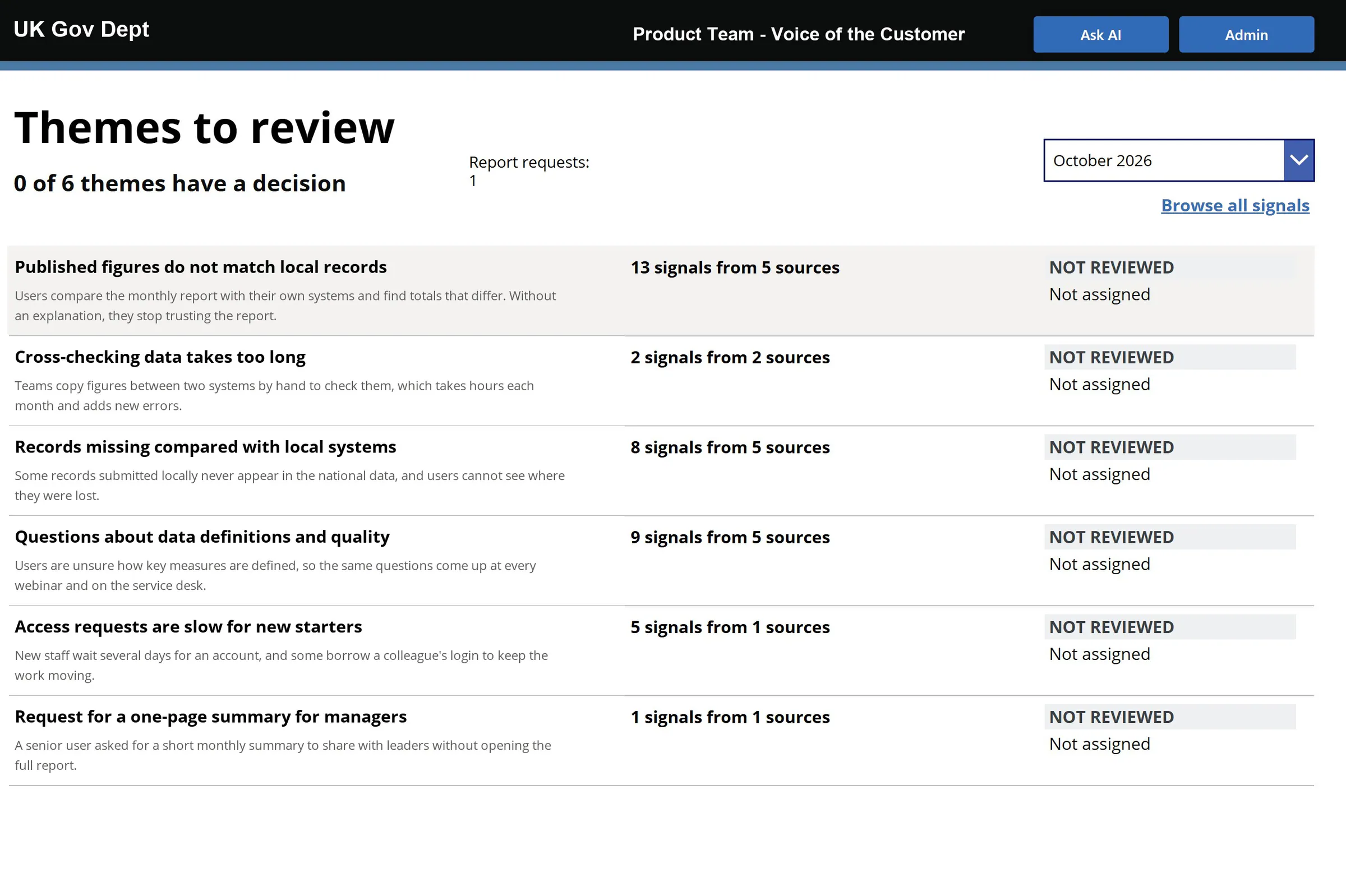
The Themes to review page for October, showing six themes with the number of signals and sources behind each one, all marked not reviewed and not assigned
The monthly themes report, showing the team which areas to focus on at its review meeting.Data shown is illustrative.

Results

The results

What the work produced.

  1. One view of every channel Multiple sources, levelled into one archive that stakeholders can read across.
  2. A monthly review that did not exist before Colleagues who share feedback, the policy team and the service owner go through each theme: does it make sense, is it what we see happening, and what is being done about it.
  3. No extra effort to share Forward an email or paste into Teams. AI does the filing and the grouping.
  4. The last attempt took three people three weeks Presented once, never repeated. This one comes back on its own.
  5. Handed over, still running The service desk run the review. A Power Platform team own the app.

Multiple channels, and no whole picture

Feedback came from everywhere: the service desk, user researchers, the policy team, the comms team's webinars and user contact, and a feedback form on the service itself. About fifty pieces a month, from multiple sources, with no single place to see it.

So the loudest voices got heard. A word from a stakeholder with the right relationships could outweigh a month of service desk tickets or a round of user testing. A year earlier, three people spent three weeks pulling it into a spreadsheet, presented once and never repeated.
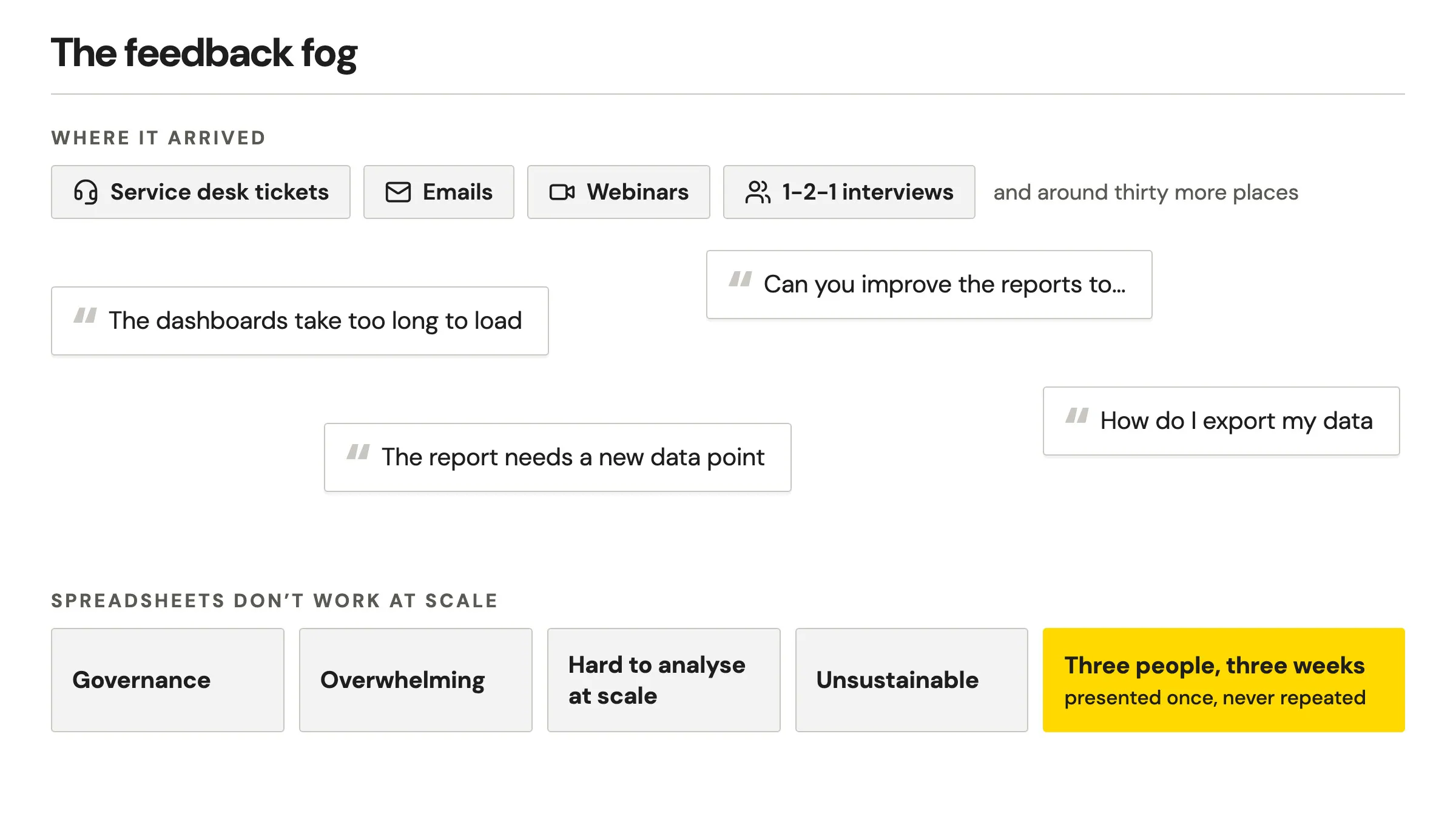
Diagram, the feedback fog: four channels feedback arrived through, four quotes from users such as "The dashboards take too long to load", and why spreadsheets do not work at scale: governance, overwhelming, hard to analyse at scale, unsustainable
What users said, where it landed, and why spreadsheets don't work at scale.

Imagining a full feedback loop

Before choosing any technology I drew the whole loop: share feedback, process, report, actions.

Human in loop at both ends, autonomous in the middle. Every piece of feedback would count the same, whichever channel it came through. Sharing had to be effortless, decisions had to stay with a person, and all of it had to live inside the department's own environment.
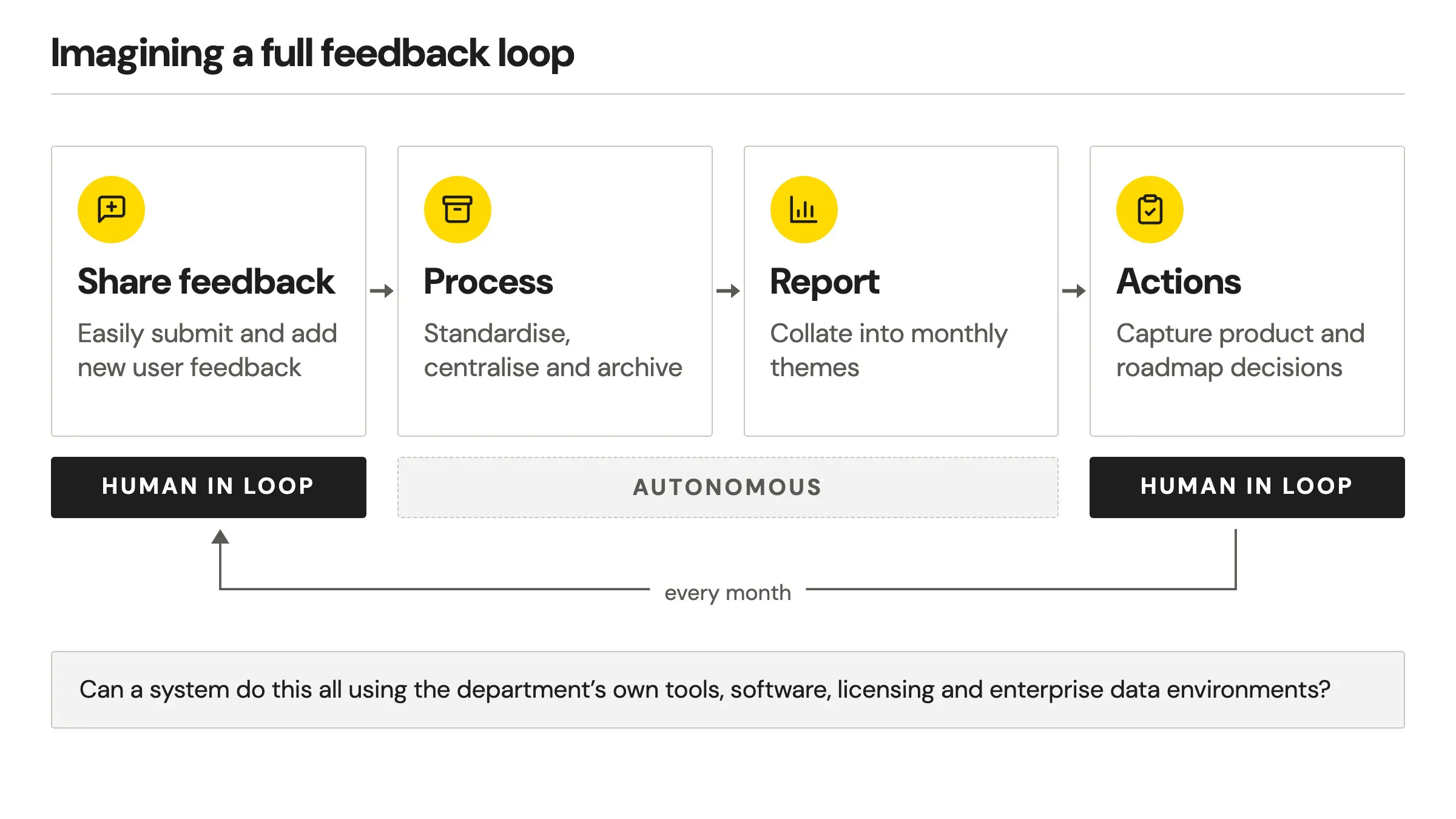
Diagram of the feedback loop: share feedback and actions are human in loop, process and report run autonomously, and the loop repeats every month
Human in loop at both ends, autonomous in the middle.

Hear it three times, then count it

A policy colleague put it plainly: “I act on things if I hear it x3 times.” Fair, but nothing was countable.

So every piece of feedback becomes a signal, and each month signals group into a few themes. A service desk ticket now counts the same as a word in a stakeholder's ear. Each theme ends in a decision with an owner: the step the spreadsheet never reached.
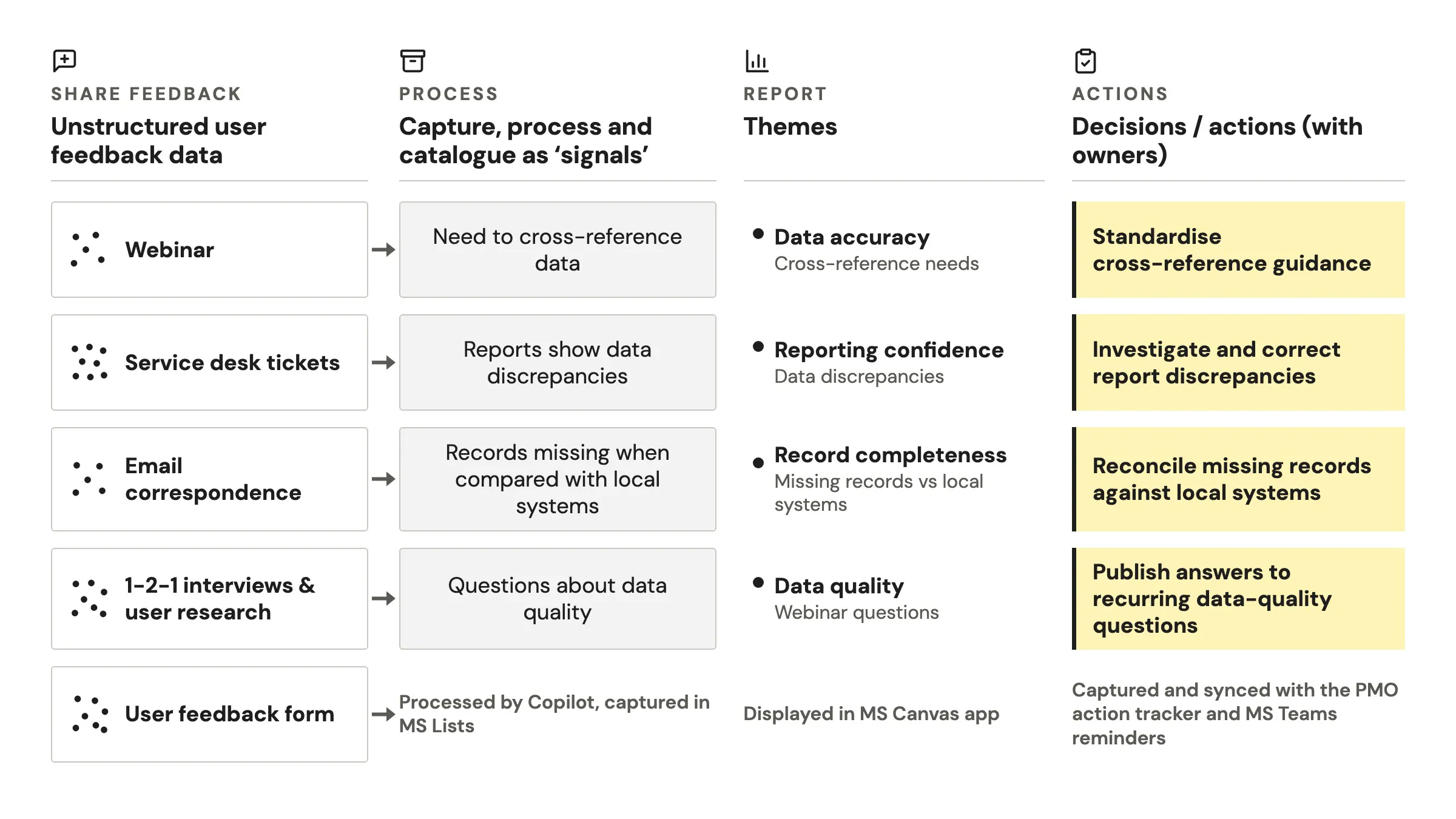
Diagram following unstructured feedback from sources such as a webinar or service desk tickets, through a signal and a monthly theme, to a decision with an owner, for example standardise cross-reference guidance
Unstructured feedback to decisions, with owners.

No extra effort to share

The breakthrough was making it effortless. If giving feedback is a chore, people stop, so colleagues simply forward an email to an inbox or paste what they heard into a Teams chat, and the service's own feedback form feeds straight in.

AI archives it, works out who it came from and which product it is about, and groups it with similar feedback. Nobody fills in a form or learns a new tool. An email confirms what the feedback became, with a link to each signal.
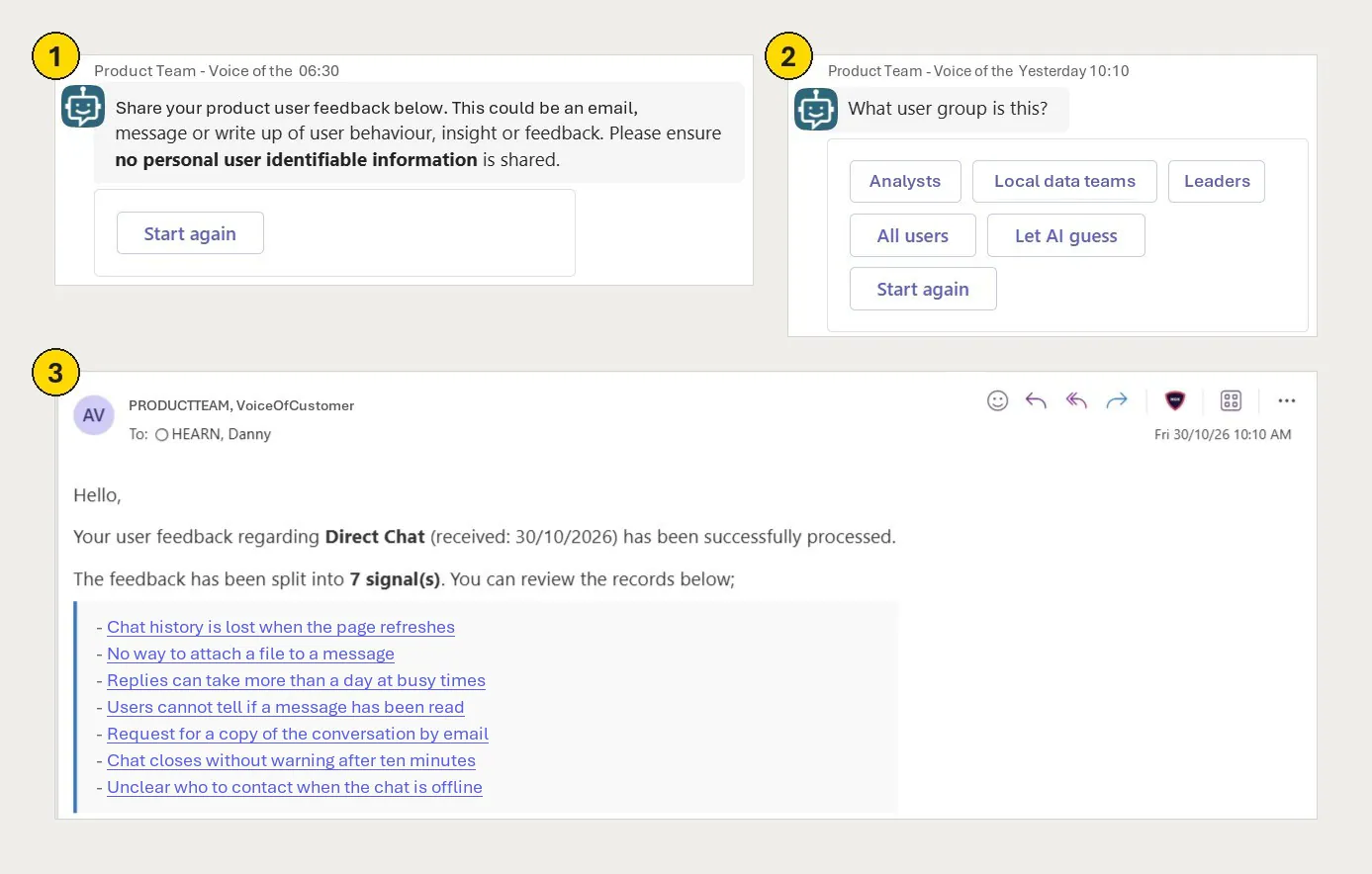
Three steps in Teams and Outlook: the bot asking for feedback with a reminder not to share personal information, the bot asking what user group it is with a Let AI guess option, and an email saying the feedback was split into seven signals, each a link
Share it, say who it is about, and get told what it became.Data shown is illustrative.

From stats and charts to insight you can act on

My first version fed a Power BI dashboard. It was accurate, but it did not get traction. In the first meeting around it I watched how people used the data: they did not want stats, pie charts and graphs. They wanted a quick, simple way to see the insight.

So I rebuilt the whole interface as an app built around insight, not stats: the month's few themes, users' own words, and an actions panel that starts empty. That worked, and it is what the monthly review runs on.
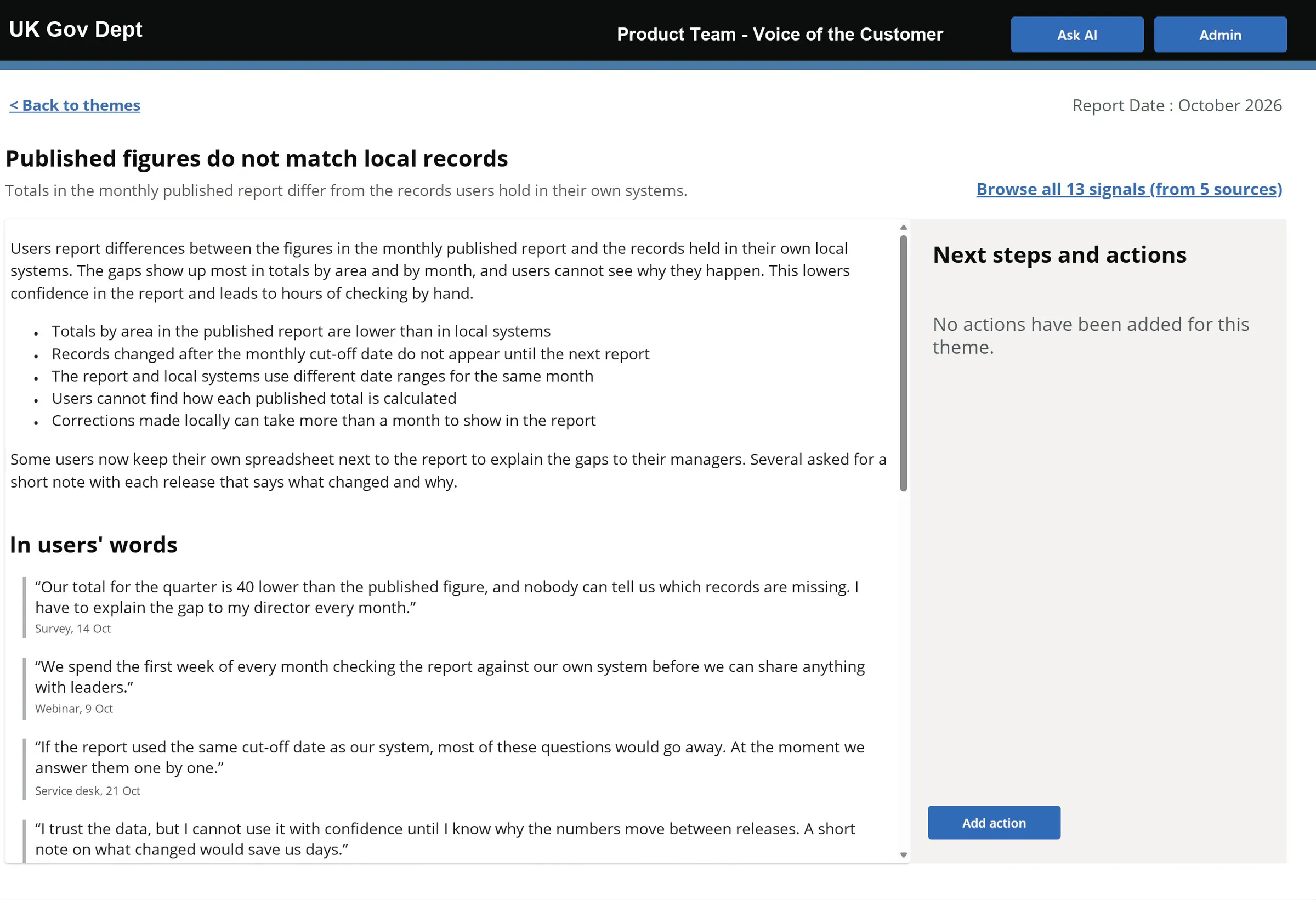
A theme page: the AI's narrative on the left, quotes under the heading In users' words, and a Next steps and actions panel on the right reading no actions have been added for this theme
The panel on the right stays empty, visibly, until somebody commits.Data shown is illustrative.

Two clicks from the words a real person wrote

The worry was never effort. It was hallucination: if AI writes the summary, how do you know it is true?

So I tested it early and often: more than fifty rounds of the AI's instructions, until it split feedback into the right signals and described them in words people recognised. Two AI agents share the work, one that knows the service and its language, and one that breaks each submission into signals. Every signal still keeps the original words, unedited.
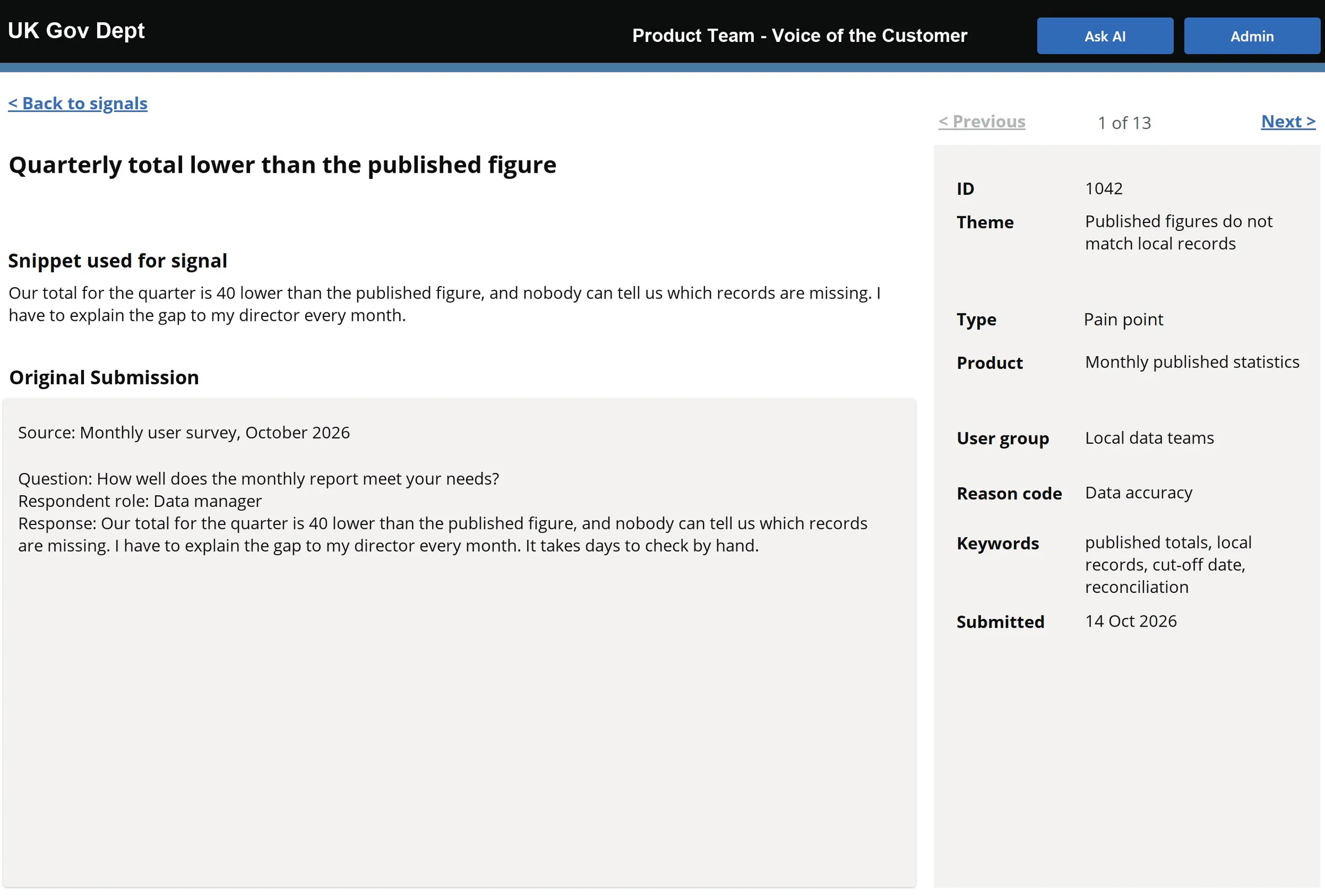
A single signal record showing the snippet used for the signal, the original submission below it, and a side panel of fields including theme, type, product, user group, reason code and keywords
Nothing is asserted that cannot be opened.Data shown is illustrative.

Nothing leaves the department

Buying a tool meant a per-seat contract and a debate about where feedback is allowed to live. A conventional build was estimated at four or five people and eighteen months.

I built it with AI inside the department's own Microsoft 365 in three to four months, so every piece of feedback stays inside the department. A short guide means the service desk team run it without me.

Reflection

What I did not expect

I expected the hard part to be getting AI to read feedback accurately. It was getting people to use what it found. An accurate dashboard was not enough: people wanted insight, not stats. An app built around themes, an empty actions panel and a monthly meeting changed that.

It is still a noise machine, not an insight machine. It tells you what people said, not what matters. That judgement stays with the people in the room.

It also points to a wider shift. Teams used to stitch feedback together in spreadsheets. Now a designer can build a custom application with AI, inside the systems the department already trusts.

Next

Let’s build something together that works

Happy to walk through the build, the decisions or what I would do differently in more detail. Or see how I help teams with AI transformation.

Book a 30-min chat